Using MCP to Track AI Brand Visibility from Coding Agents
- Jowita Chmura
- Ai brand visibility
- Published
- 07 Mins read
Using MCP to Track AI Brand Visibility from Coding Agents
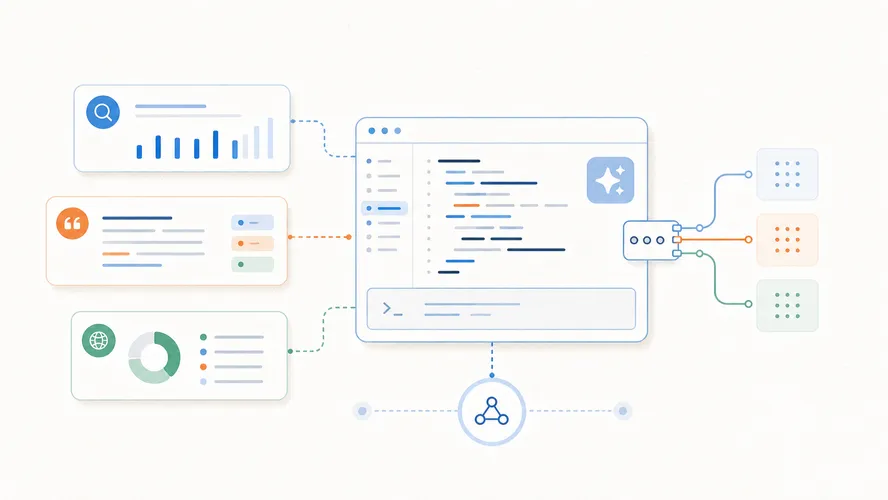
Using MCP to track AI brand visibility means giving a coding agent controlled access to the systems where your AI-search evidence lives: prompt benchmarks, scan results, citations, competitors, content files, and tickets. The value is not “an agent that does SEO”; it is a repeatable loop that turns AI-answer gaps into specific work your team can review, ship, and measure again.
Most teams get this backwards. They connect tools first, then hope the agent finds strategy. Start with the visibility benchmark instead.
[Operator Note]: MCP is useful for AI visibility when the agent can answer one boring question: “What changed, what source caused it, and what task should exist because of it?”
Key takeaways
- MCP can connect coding agents such as Codex or Claude Code to visibility data, source files, issue trackers, and reporting systems.
- The prompt set is still the measurement layer. MCP only helps when the inputs are structured enough for the agent to compare.
- A good workflow tracks mentions, recommendations, competitors, citations, source quality, and answer accuracy.
- The agent shouldn’t create broad “AI SEO” chores. It should create scoped fixes: update a comparison page, refresh a stale profile, add an FAQ, open a GitHub issue, or draft a content brief.
- Permission scope matters. MCP servers can expose data and actions, so narrow access beats a giant all-purpose connector.
- You still need human review. AI visibility is noisy, and coding agents can turn noisy findings into noisy work if the benchmark is weak.
What MCP changes in AI visibility work
Model Context Protocol, or MCP, is an open standard for connecting AI applications to external systems. Anthropic introduced MCP in 2024 as a way to connect AI assistants to data sources, business tools, and development environments through a shared protocol rather than a pile of custom connectors. Anthropic’s launch note describes MCP as a way to expose data through servers and let AI applications connect as clients through that standard interface: Introducing the Model Context Protocol.
For AI visibility, that matters because the evidence is scattered.
A brand visibility workflow might touch:
- prompt benchmark results from ChatGPT, Claude, Gemini, Perplexity, Copilot, and Google AI features;
- answer captures with dates, platforms, prompts, and visible mode context;
- citations, source URLs, and stale third-party profiles;
- competitor mentions and recommendation patterns;
- Google Search Console exports and classic SEO priorities;
- content briefs, blog posts, use-case pages, alternatives pages, and docs;
- GitHub issues, Linear tickets, or agency client-report templates.
Without MCP, a strategist copies pieces of that evidence into chat and asks for advice. The agent sees a snapshot. It can’t inspect the source files, compare prior runs, or create the implementation task unless the human pastes everything by hand.
With MCP, the coding agent can work closer to the operating system of the marketing team. It can read a scan result, inspect the related page, find the existing internal links, open an issue, draft a patch, and update the report after review.
That is the useful shift.
Not magic visibility. Less copy-paste between the signal and the work.
The workflow: from prompt benchmark to code-ready task
The clean MCP workflow starts with a defined benchmark, not a vague instruction like “improve our AI SEO.”
Use a prompt set that maps to buyer questions:
- Problem-aware prompts: “How do I monitor brand mentions in AI answers?”
- Category prompts: “Best AI visibility monitoring tools for B2B SaaS teams.”
- Comparison prompts: “AI Brand Scan vs other AI brand monitoring tools.”
- Alternative prompts: “Alternatives to manual AI visibility audits.”
- Branded prompts: “What does [brand] do, and who is it best for?”
- Implementation prompts: “How should an agency report AI visibility to a client?”
AI Brand Scan already treats this as the practical base layer. If you are starting from scratch, use the AI brand visibility audit prompt to shape the first benchmark before wiring an agent into anything.
Once the prompt set exists, the agent needs structured fields:
| Field | Why the coding agent needs it |
|---|---|
| Prompt ID | Lets the agent compare the same buyer question over time |
| Platform and date | Prevents one answer from becoming timeless evidence |
| Target brand outcome | Mentioned, cited, recommended, omitted, misdescribed, or displaced |
| Competitors | Shows which vendors own the answer for that prompt |
| Citations and sources | Points the agent toward source fixes, not random rewrites |
| Answer accuracy | Flags stale positioning, wrong category, or invented product claims |
| Business priority | Keeps the agent focused on prompts tied to pipeline, reputation, or sales |
| Suggested action | Turns the finding into a content, source, or technical task |
From there, the coding agent can do useful work:
- Read the latest benchmark run.
- Compare it with the previous run.
- Group gaps by type: missing mention, weak citation, competitor displacement, stale source, wrong description, or low-confidence movement.
- Inspect the relevant content files or source pages.
- Create a scoped task with acceptance criteria.
- Draft the fix in a branch or content file.
- Ask for human review before publishing.
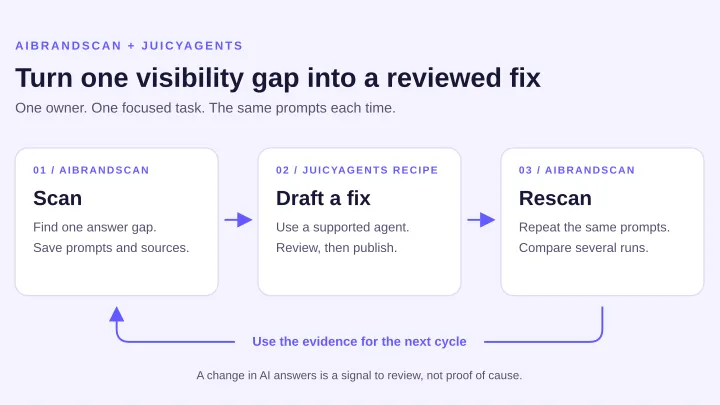
- Re-run the benchmark after the change and update the report.
The agent is not deciding your strategy in a vacuum. It is operating against a measurement system.
That distinction saves a lot of bad content.
Where coding agents fit: Codex, Claude Code, and the content repo
Coding agents are useful in AI visibility because most meaningful fixes are not just sentences in a Google Doc. They are files, templates, schemas, tickets, redirects, internal links, metadata, reports, and QA checks.
OpenAI’s Codex MCP documentation says Codex stores MCP configuration in config.toml, supports stdio and streamable HTTP servers, and lets teams configure approval behavior, allow lists, deny lists, startup timeouts, and tool timeouts for MCP tools: OpenAI Codex MCP documentation.
That kind of configuration matters for marketing operations. The agent may be touching a real repository, not a sandboxed content note.
Claude Code’s MCP docs frame the same operational pattern from another angle: MCP servers can connect Claude Code to tools, databases, APIs, issue trackers, monitoring dashboards, and external workflows, and they warn teams to verify trust because servers that fetch external content can expose prompt injection risk: Claude Code MCP documentation.
For AI Brand Scan, the practical setup might look like this:
- an MCP server for scan results or exported prompt benchmark files;
- an MCP server for GitHub issues and pull requests;
- filesystem access to the content repository;
- a Search Console or analytics export tool;
- a reporting template tool;
- a restricted content-scoring or scrubber command.
Then the agent can receive a task like:
Review the last two AI visibility scans for the “AI share of voice tracking” prompt group. Find prompts where AI Brand Scan was omitted but competitors were recommended. Create GitHub issues for the top three gaps, link the evidence, and draft one GEO content brief for the highest-priority issue.
That is much better than:
Optimize the site for AI search.
The first task has inputs, evidence, scope, and review points. The second produces mush.
The deep dive: the MCP visibility loop
The strongest agent-first workflow is a loop, not a dashboard.
Here is the version that works for SaaS teams and agencies.
1. Collect the benchmark
Run the same prompt set on a defined cadence. Weekly is enough for most teams unless there is a launch, rebrand, reputation issue, or competitor event.
Capture answer text, citations, competitors, and recommendation status. Store it in a format the agent can read without guessing: CSV, JSON, database rows, Markdown reports, or a normalized scan export.
The agent should not infer the benchmark structure from screenshots. Screenshots are useful evidence for humans. They are weak operating data.
2. Classify the gap
Every visibility problem needs a label.
| Gap type | What it means | Agent action |
|---|---|---|
| Missing mention | Competitors appear and your brand does not | Create a prompt-level content or source-gap task |
| Weak recommendation | Your brand appears but does not get the buying rationale | Inspect use-case, proof, and comparison pages |
| Wrong description | The answer misstates category, features, market, or audience | Find stale owned and third-party source patterns |
| Weak citation | The answer cites old, thin, or indirect sources | Create a source cleanup task or page refresh |
| Competitor displacement | A competitor owns prompts tied to your strongest use case | Build a competitor visibility gap brief |
| Noisy movement | One run changed but the pattern is not stable | Hold action until the next run or add samples |
This is where the agent earns its keep. It can sort 200 prompt observations faster than a human, but only if the fields are consistent.
For competitor-heavy prompts, pair this with competitor visibility gap analysis so the agent does not reduce everything to “write another blog post.”
3. Inspect the source graph
After classification, the agent should inspect the source assets that could explain the result:
- homepage and product pages;
- use-case pages;
- comparison and alternatives pages;
- documentation and help pages;
- author, organization, and product schema;
- third-party profiles, directories, reviews, and partner pages;
- stale pages still receiving impressions or citations;
- internal links pointing to the target page.
The goal is to find the smallest fix that could improve answer clarity.
Sometimes that is a new article. Sometimes it is a better FAQ section on a product page. Sometimes it is a corrected directory profile or a comparison page with clearer proof.
If the agent creates content before it inspects sources, it is guessing.
4. Create scoped tasks
Good agent-generated tasks look like engineering tickets, even when the work is marketing.
Use this shape:
| Ticket field | Example |
|---|---|
| Problem | AI Brand Scan is omitted from 6 of 10 agency reporting prompts where two competitors are recommended |
| Evidence | Scan run, prompt IDs, answer excerpts, citation URLs, competitor names |
| Suspected cause | No use-case page clearly maps AI visibility monitoring to monthly agency reporting |
| Proposed fix | Add or refresh agency reporting section and link to prompt benchmark template |
| Acceptance criteria | Page states audience, workflow, inputs, outputs, limits, internal links, and source-backed claims |
| Re-test | Re-run the same prompt group after publishing and compare recommendation status |
This is where MCP beats a static SEO dashboard. The agent can move from evidence to action while keeping the audit trail attached.
For teams already running recurring checks, the next step is AI visibility monitoring for B2B SaaS, not a one-off prompt experiment.
5. Re-run and report movement
After a fix ships, the agent should not declare victory.